Notifications
Gedeon keeps you informed about what's happening on the farm in two ways: inside the app, with the notifications bell, and outside it, with the browser's web push notifications.
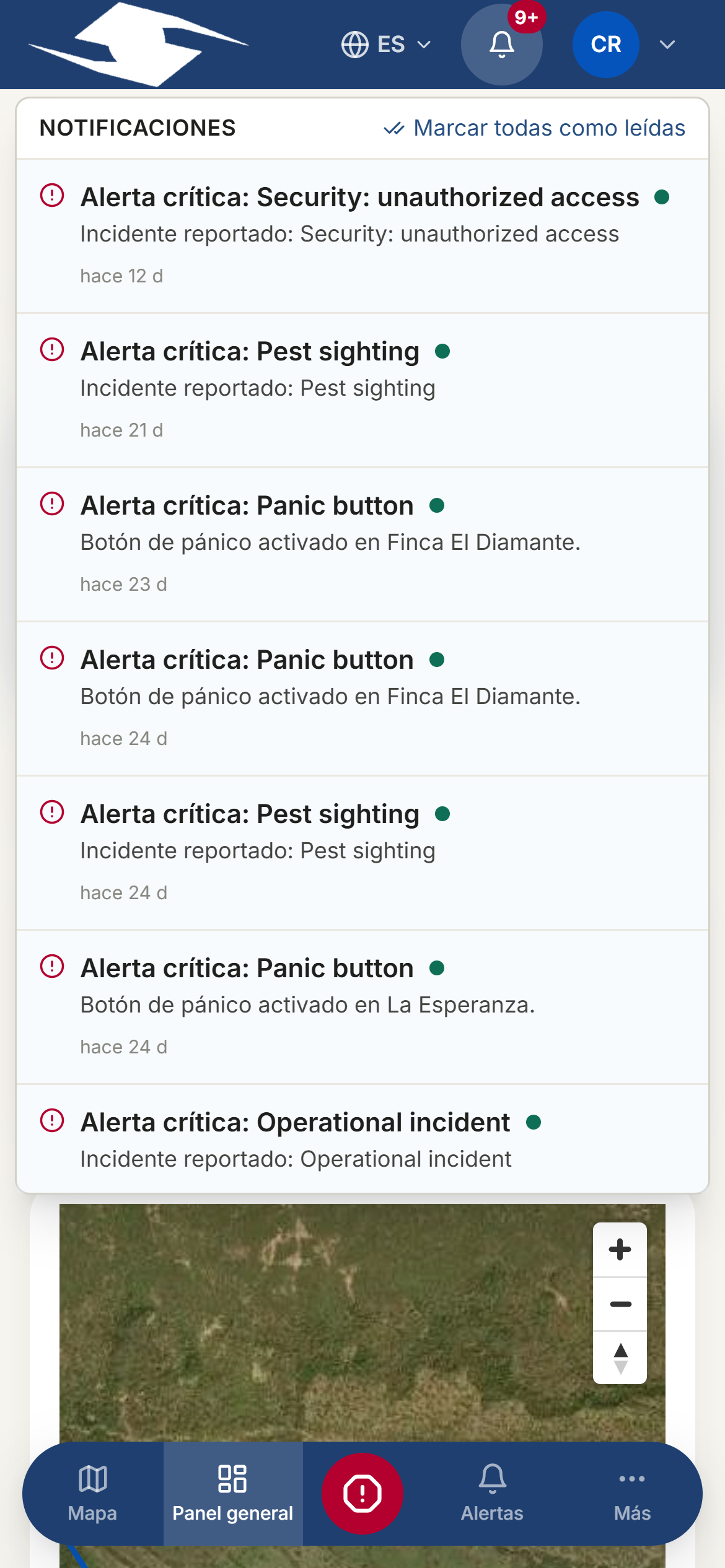
The notification center
Tap the bell (Open notifications) to open the Notifications panel. There you'll find recent alerts related to your work and your alerts.
- Tap Mark all as read to clear the list.
- If there's nothing, you'll see No notifications.
Browser push notifications
Web push notifications reach your device even when the app isn't open, just like a message from another app. They're useful for finding out about an important alert right away.
To turn them on:
- Find the Enable push notifications option.
- Accept it. During the process you'll see Subscribing….
- Once it's ready, the status changes to Push notifications enabled.
To stop receiving them, use Disable push notifications.
If the browser denies permission
If you declined the permission, you'll see Permission denied — enable in browser settings. Gedeon can't ask again for you: you must enable notifications for this site from your browser's settings and try again.
Unsupported browsers
In some browsers this feature isn't available and you'll see Push notifications not supported in this browser. The in-app notifications bell still works the same.
When there's a new version
Gedeon updates itself. When a new version is ready, the New version available prompt appears:
- Tap Update to load the latest version.
- If you'd rather keep working, you can postpone it with Dismiss.
Update when you can
Keeping the app up to date ensures you have the latest fixes and improvements. If you dismiss the prompt, update again as soon as possible.
Related
- Alerts — the control center where farm events are handled
- Alert rules — how it's decided who receives each notice and through which channel